
Workshop scheduling software
Workshop scheduling software should help the front desk see what is booked, what can still fit in, and where the day is likely to become overloaded. Workshop Buddy gives independent garages a clearer way to schedule work without relying on a paper diary.
The focus here is scheduling: booking jobs into the diary, seeing upcoming workload, and moving work quickly when customers are late or plans change.
No credit card required • 14-day free trial • Cancel anytime
Book jobs into a clear day view
See upcoming workload and available time
Move bookings when the day changes
Keep each booking linked to the job card
Book faster
Add work into the diary without the back-and-forth of paper notes.
See capacity clearly
Spot space in the day before overbooking the workshop.
Reschedule quickly
Move work when customers are late or plans change.
Keep context attached
Scheduling stays tied to the customer, vehicle, and job card.
Why independent garages choose workshop scheduling software
This page is focused on the scheduling problem: capacity, visibility, and quick changes at the reception desk.
Day-view workshop diary
See the workshop day in a clear schedule so reception can understand capacity and upcoming jobs at a glance.
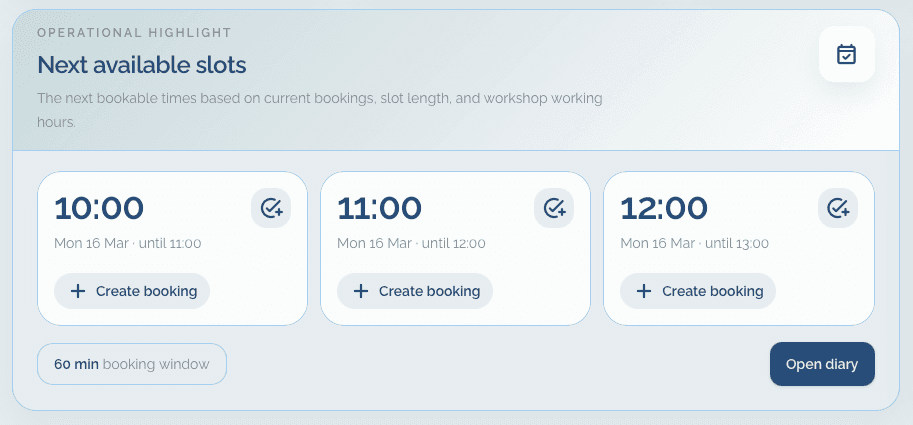
Next available slot visibility
See the next available space and book enquiries more confidently without guessing where work can fit.
Simple job movement
Reschedule jobs quickly when the workshop day changes, instead of rubbing out and rewriting a paper diary.
Linked job details
Each scheduled booking stays connected to the customer, vehicle, and job card, so the schedule is not floating separately from the work.
From enquiry to booked slot in a simple workflow
The front desk can place work into the diary, keep it accurate through the day, and open the related job details without switching tools.
Take the booking
Add the customer, vehicle, and job details, then place the work into the diary where it fits best.
Adjust the schedule as the day moves
Shift bookings when a job overruns or a customer changes plans, keeping the diary accurate throughout the day.
Keep the job moving
Open the job card from the scheduled booking so reception and the workshop stay aligned on the same job details.
The views that help reception manage workshop time
These screens are the most relevant ones for garages looking specifically for workshop scheduling software.
Next available slot
Reception can see where there is room to book more work without scanning a paper diary line by line.
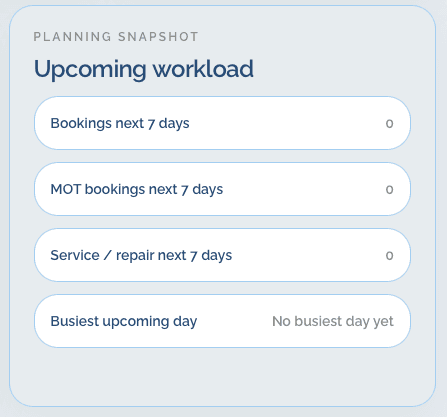
Upcoming workload
A clear view of the upcoming jobs helps the front desk see what is booked and what is coming next.
A good fit for garages that need clearer workshop capacity
This page is most relevant for workshops where the main problem is fitting jobs into the day and keeping the schedule accurate.
Independent garages that want a clearer way to book and reschedule work throughout the day.
Reception teams that need to see available time quickly before promising jobs to customers.
Vehicle workshops replacing a paper diary with something easier to keep accurate when plans shift.
Questions about workshop scheduling software
These answers focus on how Workshop Buddy handles booking visibility, rescheduling, and linked job information.
Does Workshop Buddy help with workshop scheduling?
Yes. The diary is built to help workshops book jobs, see the day clearly, and move bookings when plans change.
Is it more like a diary or a full workshop management system?
It is a lightweight workshop management system with a strong focus on the diary, scheduling, and the front-desk workflow for independent garages.
Can I see available time before booking another job?
Yes. Workshop Buddy includes visibility into upcoming workload and next available booking space so reception can schedule work more clearly.
Does scheduling stay linked to the actual job?
Yes. Scheduled work remains tied to the customer, vehicle, and job card rather than sitting in a separate calendar tool.
Start a free trial and give reception a clearer booking schedule
Book jobs faster, see available time more clearly, and keep workshop scheduling tied to the rest of the job workflow.
Pricing starts at £49 per month or £490 per year per workshop.
Related pages for workshop scheduling research
If you are comparing diary tools and job organisation tools, these pages cover the connected parts of the workflow.
See the full Workshop Buddy product page
Return to the homepage for the main pricing, screenshots, and overall product summary.
Garage booking diary software
A more diary-specific page for workshops moving away from a paper booking book.
Garage management software
See the broader overview covering scheduling, records, and job cards together.
Garage job card software
See how scheduled jobs connect directly to printable job cards and workshop notes.